Key takeaways
- Light matters most: shoot in soft daylight near a window and turn the flash off.
- Clean the lens, turn on the grid, get closer with your feet and clear the background.
- Shoot vertically: 4:5 (1080 × 1350) for feed posts, 9:16 (1080 × 1920) for Reels and Stories.
- Edit lightly and avoid heavy filters so customers recognise what they get.
- If people can be identified, it’s personal data under UK and EU GDPR: ask before you post.
You don’t need an expensive camera to make your business look great on social media. The phone in your pocket is more than good enough — what makes the difference is light, framing and a little patience.
This guide covers the handful of habits that turn ordinary phone snaps into photos people stop scrolling for, along with the sizes that fit each platform and the permission rules to keep in mind when people are in the picture.
1. Light is everything
If you only change one thing, make it this. Good light makes food look fresh, products look premium and people look like themselves.
- Use daylight. Shoot near a window or outside in the shade. Soft, indirect daylight is the most flattering light there is.
- Avoid the flash. It flattens everything and creates harsh reflections. Turn it off.
- Watch for mixed light. Warm indoor bulbs plus cool daylight make colours look strange. Turn off the overhead lights when you’re using a window.
- Avoid harsh midday sun directly on your subject. Move into the shade or wait for later in the day.
- Mind the shadows. A white napkin, menu or piece of card held opposite the window bounces light back and softens them.
2. Clean the lens
It sounds obvious, but phones live in pockets and bags. A quick wipe with a soft cloth removes the haze that makes photos look soft and washed out. Make it a habit before every shoot.
3. Framing that works
Turn on the grid
Switch on the camera grid in your phone’s settings. It divides the screen into thirds and helps you keep horizons straight and subjects well placed. Putting your subject on one of the lines or crossings, rather than dead centre, often makes a photo feel more natural.
Get closer — with your feet
Avoid digital zoom; it throws away detail. Walk closer instead. Many phones have a second, telephoto lens (often marked 2× or 3×) — that one is fine to use.
Clear the background
Remove clutter — cables, bins, half-empty glasses, paperwork. A clean background makes your subject the star. For dishes and products, a plain table, a wooden board or a simple wall works perfectly.
Try different angles
- From above — great for flat dishes, coffee art, flat-lays of products
- At 45 degrees — how people naturally see a plate or a product on a counter
- Eye level — best for burgers, drinks, stacked items and people
Take a few of each and pick the best later.
4. Shoot in portrait — and leave some space
Most social media is viewed on phones held upright, so portrait (vertical) photos take up more of the screen than landscape ones. Leave a little space around your subject so it can be cropped to different shapes without cutting anything important off.
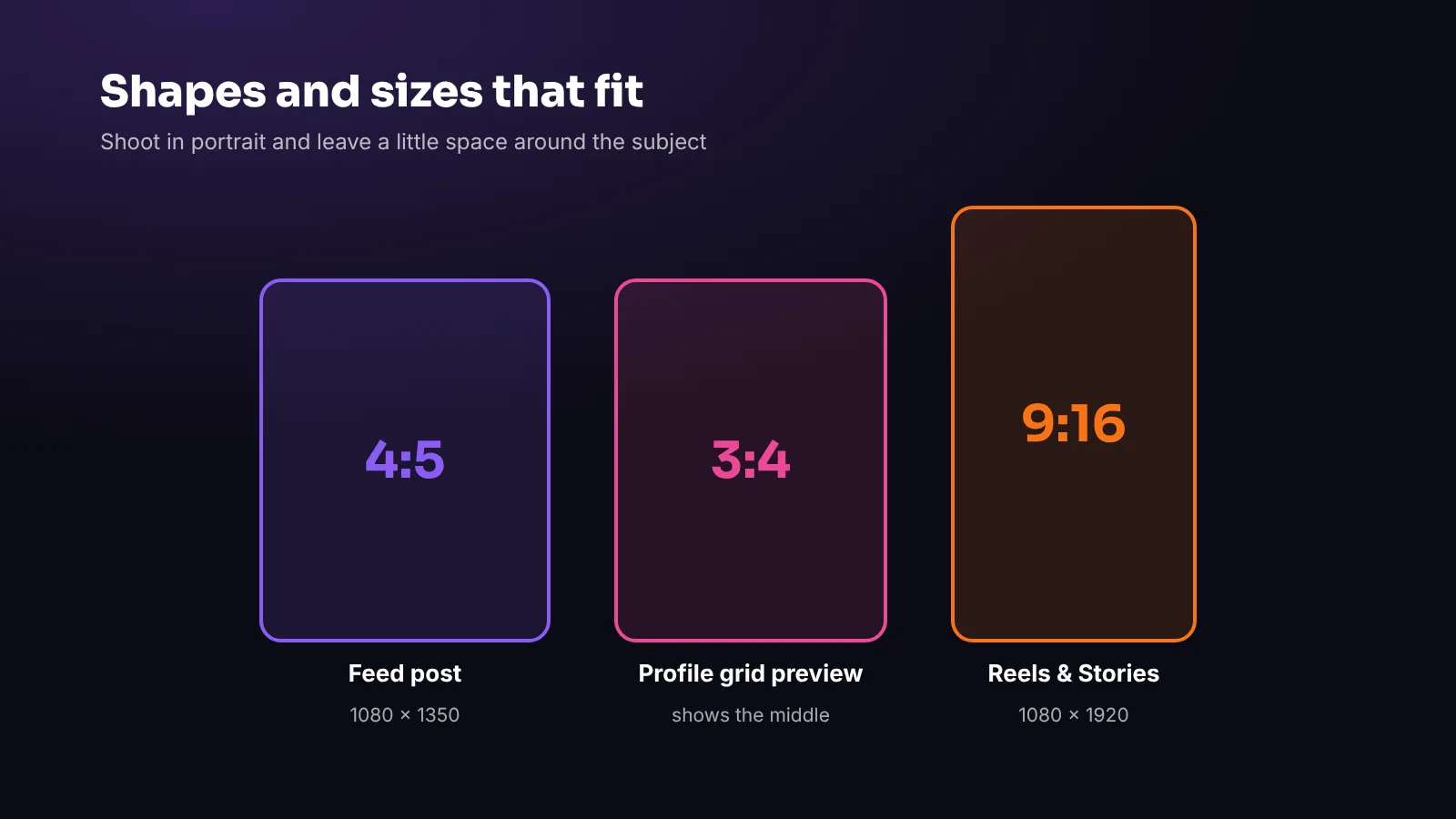
- Instagram and Facebook feed posts: 4:5, ideally 1080 × 1350 pixels
- Instagram profile grid: since early 2025 the grid shows taller 3:4 previews, so keep the important part of the picture in the middle
- Reels, Stories and TikTok: 9:16, 1080 × 1920 pixels — keep text and faces away from the very top and bottom, where buttons and captions sit
5. Video: steady, short and well lit
The same rules apply to video, with two additions:
- Keep it steady. Hold the phone with both hands and your elbows tucked in, lean on a counter, or use a small tripod.
- Keep it short. Instagram Reels can now run up to three minutes, but 10–30 seconds of genuinely interesting footage beats a long clip that wanders. Show the moment: the pour, the plating, the reveal, the finished look.
Record in good light, and shoot a few extra seconds at the start and end of each clip so you have room to edit.
6. Edit lightly
A few small adjustments in your phone’s built-in editor are usually all you need:
- Straighten anything that’s tilted
- Crop to the shape you need
- Brightness and exposure — a touch brighter often helps
- Warmth — correct any yellow or blue tint so whites look white
- Sharpness — a little, never a lot
Avoid heavy filters, especially on food and products. Customers should recognise what they get when they arrive. Consistent, natural edits also make your feed look more professional as a whole.
7. People in your photos: ask first
Customers, staff and passers-by make photos feel alive — but if someone can be identified in a photo, that image counts as personal data under UK and EU GDPR. In practice:
- Ask before you post a photo where someone can be recognised, and explain where it will appear.
- Be especially careful with children — get a parent’s or guardian’s permission, or keep them out of shot.
- Respect a “no”, and remove a photo promptly if someone later asks you to.
- For staff, agree in writing how photos of the team will be used.
When in doubt, photograph hands, products and the space rather than faces.
8. Make it a routine
The businesses with the best photos don’t wait for inspiration. They have a routine:
- Shoot new dishes or products the day they arrive, in good light
- Take a five-minute “content walk” once a week: the space, the team, the details
- Batch photos for the week ahead (see our guide to planning a month of posts in one hour)
- Keep a shared album of your best shots so anyone on the team can use them
Frequently asked questions
What size should Instagram photos be?
For feed posts use 4:5, ideally 1080 × 1350 pixels. For Reels and Stories use 9:16, 1080 × 1920 pixels. The profile grid shows a 3:4 preview, so keep the subject central.
Do I need a professional camera for social media?
No. A modern smartphone is more than good enough. Good light, a clean lens and simple composition make a far bigger difference than equipment.
Do I need permission to post photos of customers?
If someone can be identified, the photo is personal data under UK and EU GDPR. Ask first, explain where it will appear, take extra care with children and remove it if they later ask.
Should I use filters on food photos?
Keep edits light: straighten, crop, adjust brightness and correct colour. Heavy filters make food look unnatural and can disappoint customers.
The bottom line
Good light, a clean lens, a clear background and a vertical frame will improve your photos more than any new gadget. Edit lightly, ask permission when people are in the shot, and make photography part of your weekly routine.
At Viraluna, clients simply upload their phone photos and videos to our portal — we choose the best, edit them and turn them into posts. See how it works.