Key takeaways
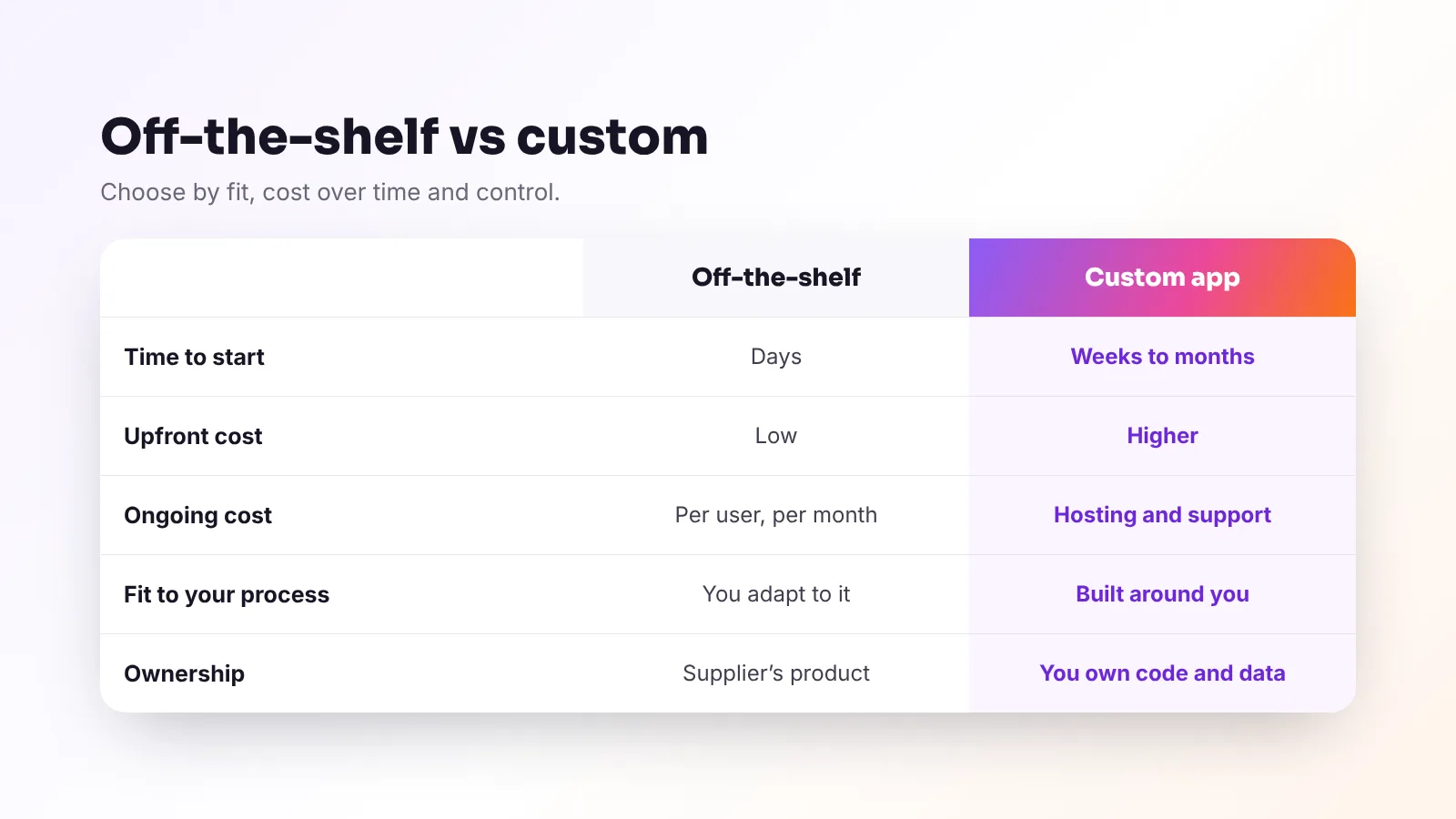
- Start with off-the-shelf software when it fits 80% of what you need — it’s faster and cheaper.
- Build custom when your process is your advantage, when you’re paying for several tools that don’t talk to each other, or when nothing fits.
- Progressive web apps (PWAs) install on phones from the browser and work across devices from one codebase; app-store apps suit some needs.
- A good project starts with discovery, a written scope and a clickable prototype before any build.
- Make sure you own the code, data and designs, and that security and data protection are built in from day one.
Every growing business reaches the point where spreadsheets, sticky notes and a patchwork of apps stop working. The question is whether to buy another tool or build something that fits exactly. Both can be right. This guide helps you decide — and if you build, how to do it without the classic software-project headaches.
When off-the-shelf software is the right choice
Ready-made software (often called SaaS) is ideal when:
- Your need is common — accounting, payroll, booking, email marketing, point of sale.
- A tool covers most of what you need and you can adapt your process for the rest.
- You want to start quickly with predictable monthly costs.
- The supplier handles updates, security and support.
Check: data export options, integrations, price increases as you grow, and where your data is stored.
When a custom app pays off
- Your process is your advantage — a unique booking flow, loyalty scheme, ordering system or service model.
- You’re juggling several tools that don’t talk to each other, with staff copying data between them.
- Per-user fees add up — subscription costs grow with every person or location.
- Customers need a better experience — a portal, an app for orders or bookings, a member area.
- Nothing on the market fits your sector or language needs.
Often the best answer is a hybrid: keep proven tools for accounting or payments and build a custom layer that connects them and adds what’s missing.
Examples of custom apps for local businesses
- Client portals — customers see orders, bookings, documents and messages in one place. (Viraluna’s own client portal is an example.)
- Booking and ordering systems tailored to how you work
- Loyalty and membership apps with digital stamp cards, rewards and member pricing
- Staff tools — rotas, checklists, stock counts, job sheets on phones
- Dashboards that bring sales, bookings and marketing data together
Web app, PWA or app-store app?
- Web app — runs in the browser on any device. Easiest to update and share.
- Progressive web app (PWA) — a web app that can be installed on the home screen, work offline for some tasks and, on modern devices, send notifications. One codebase for phones, tablets and computers.
- Native app-store apps — downloaded from the App Store and Google Play. Best when you need deep device features or a presence in the app stores; usually more cost and maintenance.
For most small businesses, a well-built PWA delivers the app experience at a fraction of the cost.
What a good app project looks like
- Discovery — workshops to understand your goals, users and process.
- Written scope — what will be built, what won’t, and how success is measured.
- Clickable prototype — you try the screens before any code is written.
- Build in stages — regular demos so you see progress and can steer.
- Testing — on real devices, with real users, including accessibility checks.
- Launch and support — monitoring, fixes and a roadmap for improvements.
Security and data protection by design
- Secure logins, including two-step verification for staff and admins
- Roles and permissions so people only see what they should
- Encryption in transit and at rest
- Data protection by design — a requirement under UK GDPR and EU GDPR: collect only what you need, protect it and delete it when no longer needed
- Backups and monitoring, with a plan for incidents
- Regular updates to keep dependencies secure
Cost and ownership
Custom software costs more upfront than a subscription, but you’re paying for something that fits and that you own. Compare the total cost over three years: subscriptions, per-user fees, staff time lost to workarounds, and the value of a better customer experience.
Before you sign, confirm in writing:
- You own the code, designs and data once payments are made
- You get the source code and access to hosting and accounts
- Documentation exists so another developer could take over
- Support terms — response times and costs after launch
Frequently asked questions
Should a small business build a custom app?
Build custom when your process gives you an advantage, when several tools don’t work together, when subscription costs keep rising or when nothing on the market fits. Otherwise, start with off-the-shelf software.
What is a progressive web app?
A progressive web app is a web application that can be installed on a phone’s home screen, work across devices from one codebase and offer app-like features such as offline use and notifications.
How long does it take to build an app?
A focused first version usually takes from a few weeks to a few months, depending on features and integrations. Starting with a clickable prototype and a clear scope keeps it on track.
Who owns a custom app?
You should. Agree in writing that you own the code, designs and data once paid, and that you’ll receive the source code and account access.
Can a custom app connect to my existing tools?
Usually, yes. Most modern booking, payment, accounting and marketing tools offer integrations, so a custom app can connect them and remove manual copying.
The bottom line
Buy what’s common, build what makes you different. If you build, start with discovery and a prototype, insist on security and ownership, and launch a focused first version you can grow.
Viraluna Studio designs, builds and supports custom web and mobile apps, portals and internal tools for businesses across the UK and Europe. Explore web and mobile apps or read about AI automation.